Proposed Changes to Colors in R Graphics
Paul Murrell
Department of Statistics
The University of Auckland
paul@stat.auckland.ac.nz
Moving to sRGB as the graphics engine colorspace
The motivation for this RFC is that currently the R graphics
engine stores colors as RGB tristimulus values, but without
any mention about which RGB colorspace that is. In particular,
there is no assumption about the chromaticities of the
RGB primaries and there is no assumption about the whitepoint.
There is some notion of gamma, but it is, at best, a little
confused. Currently, an R color object is completely ambiguous.
If we select sRGB as the colorspace for the graphics engine,
it comes with specific chromaticities for the RGB primaries,
a specific white point, and a specific gamma correction.
This would mean that R color objects would have a clear
meaning. Because sRGB is an industry standard, R color objects
would also have a useful meaning because they would be set up
to "just work" on most modern computer screens (within the bounds
of what is necessary for statistical graphics; we're not
aiming for desktop publishing or photographic manipulation
standards).
Having sRGB as the graphics engine colorspace would also
make it easier to write code for working with colors,
such as the 'colorspace' package,
because the target, R color objects, would be well-defined.
Implications for the graphics engine
No changes need to be made to most of the C code (except maybe some
comments need adding :). sRGB colors can be stored using the
existing 24-bit structure; only the meaning of these values
is altered (basically, from meaningless to meaningful).
The alpha channel is orthogonal to the colorspace, so is not
affected. (Though if anyone ever wanted to play with something
like alpha-compositing, I believe the non-linear sRGB values would have
to be linearized (reverse the gamma correction) before doing the
compositing. The 'colorspace' package offers some hope there.)
There is code in colors.c that supports the hcl() function,
but this is already designed for sRGB (it uses the sRGB
primaries, white point, and gamma).
User-level functions
The rgb() function requires no change, BUT it would need to
be acknowledged that the R, G, B values would be interpreted
as sRGB values.
The hsv() function needs a bit of work.
An HSV colorspace is a "relative" colorspace - it is a conversion
of a particular RGB colorspace. If R's colors are sRGB, then the
HSV colors produced by hsv() are relative to sRGB. This means that
the current 'gamma' argument to hsv() is NOT needed and should be
deprecated. (Ditto for rgb2hsv() and rainbow().)
See some tests below that demonstrate the new
behaviour.
There is a function covertColor() to convert between colorspaces.
This is basically independent of R's colours so can remain unchanged.
Colour values created in the "sRGB" colorspace with this function
can be used directly as input to rgb().
Implications for graphics devices
There are two issues for devices:
-
Off-screen (file) devices will want to record that colors are being
specified in the sRGB colorspace; this will help in
viewing and printing the output.
postscript() already has a 'colormodel' argument that allows RGB,
greyscale, or CMYK (trivial conversion from RGB). These color models were
applied by using PostScript operators setrgbcolor, setcmykcolor,
and setgray.
The RGB colormodel is now interpreted as sRGB, applied using
setcolor and setcolorspace
(see the PostScript Language
Reference Manual, third edition, p. 225).
The PDF device also has the 'colormodel' and RGB is now sRGB via
CS/cs (ColorSpace) and SCN/scn (SetColor) operators
(see pp. 256-257 of the PDF Reference, seventh edition).
This device makes use of an ASCIIHexDecode version of
srgb.icc (from the ghostscript sources),
which is installed in $R_HOME/library/grDevices/icc/.
-
Screen devices also have to adjust how they handle gamma correction.
sRGB assumes a very specific gamma correction, which means that
the device will not have to do anything about gamma correction
if the device conforms to the sRGB specification and, for devices
that do not conform, the sRGB spec provides precise information
that should be enough for the device code to adjust R color
objects to the specifications of the device.
The Quartz device uses CGColorSpaceCreateWithName(kCGColorSpaceSRGB)
and CGColorCreate() and CGContextSet[Fill|Stroke]ColorWithColor()
to set colours using sRGB.
(Used to use CGContextSetRGB[Fill|Stroke]Color() which was a
"generic RGB colorspace".)
The x11() and windows() device both have a 'gamma' parameter (internally,
X11 splits this into separate RedGamma, BlueGamma, and GreenGamma, but all
three key off the one 'gamma' anyway). This gamma is applied as a simple
power exponent to RGB colour components.
The default value for 'gamma' in both case is 1
(no gamma-correction) AND
these gammas have always been fudge factors because there has never been
any notion of RGB primaries (or a whitepoint).
These 'gamma' parameters have been left as fudge factors
(defaulting to 1). The RGB values sent to the device are sRGB
and that should be about right for most monitors. If things don't
look right on your monitor, you can play with 'gamma' as a crude
extra gamma-correction fudge. If you want to play around with
fancier colour transformations, use something like convertColor()
or the 'colorspace' package. If exact colour reproduction is your
bag, maybe R isn't for you.
Third-party drivers would need to be looked at. I suspect that
currently they do nothing about gamma, which would, without any
code changes, become probably the correct thing to do (at least as
a default).
Implications for add-on packages
-
The 'colorspace' package:
-
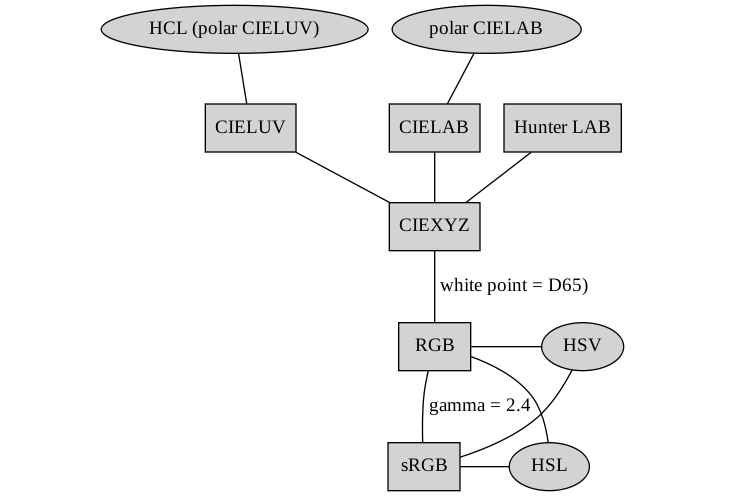
The existing "RGB" colorspace is a linearized sRGB (no gamma-correction).
A new "sRGB" colorspace has been added. The hex() function now
converts to "sRGB" before converting to hexadecimal.
All 'gamma' parameters are deprecated because "sRGB" has an implicit gamma
(and "RGB" is a linearized version of "sRGB").
The "HSV" and "HSL" colorspaces are now strictly relative to one of
"RGB" or "sRGB". It is only possible to convert from and to "HSV" and
"HSL" from or to one of "RGB" or "sRGB". Other colorspaces can then
be reached from "RGB" or "sRGB".
See some tests below that demonstrate the new
behaviour.
-
TODO: The hex() function should have an alpha argument to allow
semitransparency.
The diagram below illustrates what the relationships between the
different colorspaces would look like following these changes.
-
The 'dichromat' package.
Based on a look at the code, plus the Vienot et al. (1999) article
it is based on, moving to sRGB just puts this package on a firmer
foundation.
The package interpolates (via loess smooth) deuteranope and protanope
colors based on a fixed set of normal-to-color-blind mappings (as
provided in the Vienot at al article). The important point seems to be
that the mappings in the article made asumptions about display screen
primaries, white point
and gamma that correspond pretty closely to sRGB (see paragraph 3
on page 244 of the article). This suggests that it is very appropriate to
send sRGB triplets into 'dichromat' from R and to interpret triplets
fed back to R by 'dichromat' as sRGB triplets, which is what will now
be the case.
One detail to worry about is whether values being passed back-and-forth
are gamma-corrected. The values in the crucial table of mappings
in the Vienot et al article are uncorrected (see "step 1" on page 245
of the article, which performs the (crude) gamma correction; and
"step 7" on page 248, which performs the inverse). This means
that the interpolations in 'dichromat' are occurring on uncorrected
values, so values returned by 'dichromat' are uncorrected and
that the 'dichromat' code is interpreting incoming values as
uncorrected.
Code structure
An overall issue is where to put the code that does conversions
between colorspaces. Currently at least some transformations exist in
each of the following places:
-
C code supporting hcl() in 'grDevices' (colors.c)
(just does the polarLUV to sRGB conversion).
-
C code in 'colorspace' package (does a range of colorspace
conversions).
-
R code in convertColor() et al in 'grDevices' (does a slightly
different range of colorspace conversions).
Graphics devices may need to do these conversions
so it make most sense to have it in C code within
(the graphics engine of) the base system. The main disadvantage
of that would be that it would not be easy for anyone outside R core to
extend the code to new colorspaces (which IS currently possible
via the R-level interface associated with convertColor()).
The following code demonstrates some problems with the old setup
(R < 2.13.0 and 'colorspace' < 1.1-0):
    library(colorspace)

    # VERY different colors (because hsv() is not gamma-correcting)
    # [hex(..., gamma=2.4) because of bug in colorspace (see below)]
    plot(1:2, cex=40, pch=16, xlim=c(0, 3), ylim=c(0, 3),
         col=c(hsv(0, .5, .5),
               hex(HSV(0, .5, .5), gamma=2.4)))

    # MUCH better given correct gamma
    # (colors still not identical because hex() uses the
    #  exact sRGB gamma correction formula)
    plot(1:2, cex=40, pch=16, xlim=c(0, 3), ylim=c(0, 3),
         col=c(hsv(0, .5, .5, gamma=1/2.2),
               hex(HSV(0, .5, .5), gamma=2.4)))

    # hcl() gets exactly the same answer as colorspace's HSV()
    # > as(HSV(0, .5, .5), "polarLUV")
    #            L        C        H
    # [1,] 61.92659 33.32213 12.18075
    plot(1:2, cex=40, pch=16, xlim=c(0, 3), ylim=c(0, 3),
         col=c(hcl(12.18075, 33.32213, 61.92659),
               hex(HSV(0, .5, .5), gamma=2.4)))
Here is a similar set of checks with the new setup
(R >= 2.13.0 and 'colorspace' >= 1.1-0):
    library(colorspace)

    # hsv() is now relative to sRGB
    # hex() produces sRGB
    # NOTE: hex() converts "HSV" to "sRGB" by default
    # So the following give the same answer
    plot(1:2, cex=40, pch=16, xlim=c(0, 3), ylim=c(0, 3),
         col=c(hsv(0, .5, .5),
               hex(HSV(0, .5, .5))))

    # This replicates the "lighter" hsv() colours from the old set up
    # The main point is to convert "HSV" to "RGB" instead of "sRGB"
    # (then can convert to "sRGB" and then back to "HSV", the final
    #  value now being relative to "sRGB")
    # > as(as(as(HSV(0, .5, .5), "RGB"), "sRGB"), "HSV")
    #        H         S        V
    # [1,] 360 0.2696082 0.735357
    plot(1:2, cex=40, pch=16, xlim=c(0, 3), ylim=c(0, 3),
         col=c(hsv(1, 0.2696082, 0.735357),
               hex(as(HSV(0, .5, .5), "RGB"))))

    # hcl() and polarLUV() should match up
    # > as(as(HSV(0, .5, .5), "sRGB"), "polarLUV")
    #             L        C        H
    # [1,] 35.11828 44.78684 12.17607
    plot(1:2, cex=40, pch=16, xlim=c(0, 3), ylim=c(0, 3),
         col=c(hcl(12.17607, 44.78684, 35.11828),
               hex(polarLUV(35.11828, 44.78684, 12.17607))))
Other colorspaces
It might be possible to use something fancier than sRGB for the
internal storage of colors (e.g., CIE XYZ), but this has not been
seriously considered because it
would be overkill and would force the introduction of a lot
more conversions in the core graphics code (with a corresponding
cost both in terms
of code and performance).
One issue is the fact that sRGB has a restricted gamut (i.e., it
cannot produce all possible colors) and other colorspaces can do
better (e.g., Adobe RGB ?), but I still think sRGB is the way to
go because it is recognised by so many different platforms/formats.